Previewing EPS files on macOS
Apple dropped support for quicklooking and viewing Encapsulated PostScript (EPS) file a while ago, but I wasn’t aware of that since I used OSX Mojave before turning back to macOS two years ago after a 4-year hiatus. I was in the middle of browsing some old Stata code for a biostatistical primer and I wanted to check some figures. All the code was written using Stata 13 which only supported EPS as a high-def graphical backend for further $\TeX$ processing.
See PostScript’s sudden death in Sonoma for a more in-depth discussion. See also this thread on Apple Community help forum.
Here’s one way to preview EPS file using a Quick Action from the Finder. It
assumes you have the epstopdf program, which is usually bundled with
MacTeX.1 There’re probably other options but I was in a hurry and I’m no
AppleScript expert.
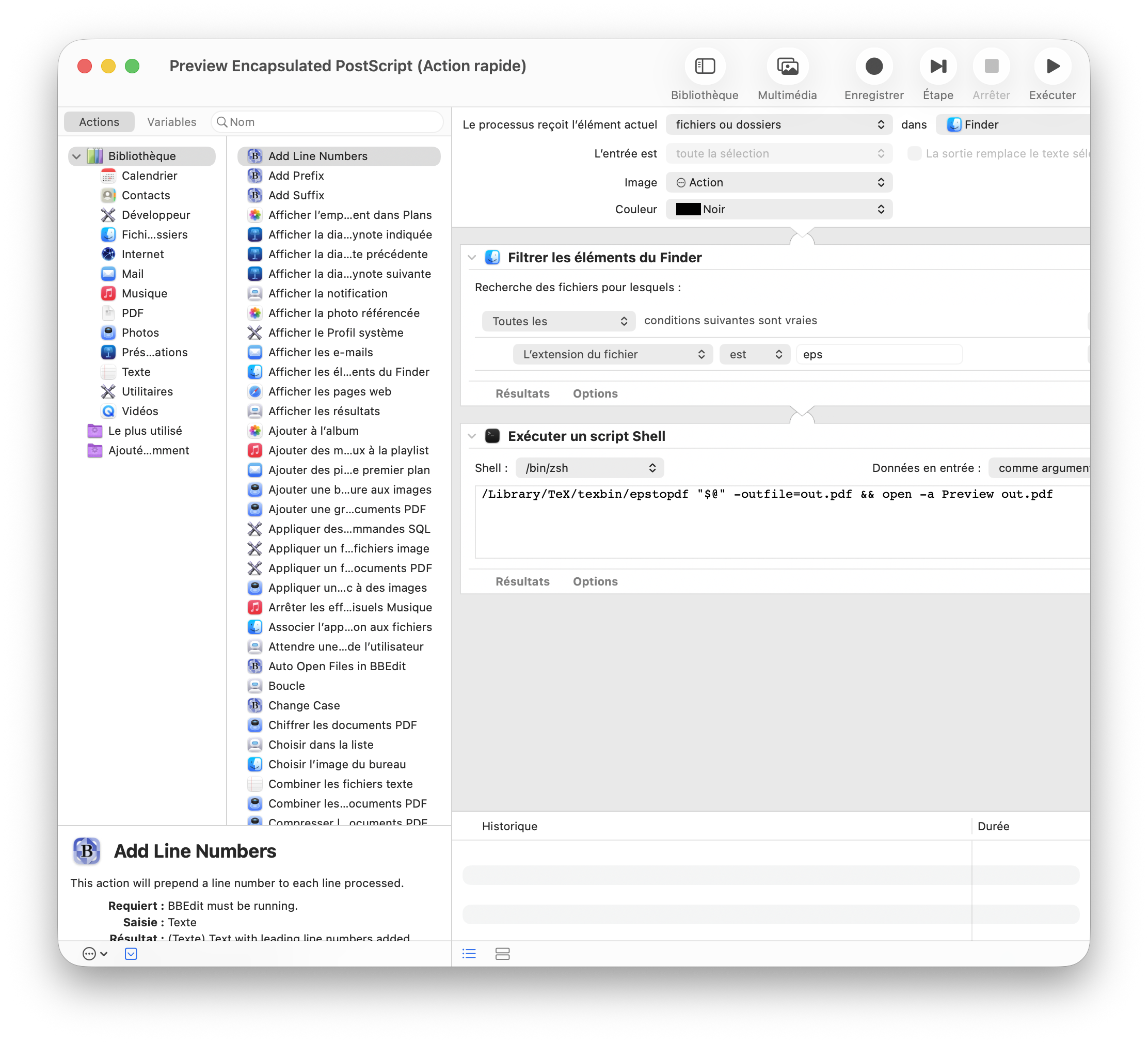
The preceding version of this workflow includes two additional steps that happened to be unnecessary. This version was updated on 2026-08-21.
Yes, this is using Automator to define a convoluted workflow (basically to
filter Finder items based on their extension) but it does not quite do the job
actually. The Quick Action remains available for any filetype. In order for this
action to be visible only for EPS file, we need to edit the Info.plist that
sits in the workflow folder manually. If you look carefully, you’ll notice that
the NSSendFileTypes key is set to <string>public.item</string>. Update the
key to the following values and it should work:
<key>NSSendFileTypes</key>
<array>
    <string>com.adobe.encapsulated-postscript</string>
    <string>public.eps</string>
</array>
Now, I can right click on an EPS file and it get converted on the fly (in the
user home directory) and sent to Preview app. This action is not available for
other filetypes. It would be cool if we could call the Quick Action when double
clicking the file directly but it seems it is not possible. However, the Finder
Preview Pane displays the quick action so in case I need to preview many files
at once, I can just open it with its defualt shortcut (⇧⌘P).
If you want the full Service file, it is available here: Preview Encapsulated
PostScript (fixed as of 2026-08-21). Unzip, rename, and put the workflow in
$HOME/Library/Services.
♪ The Velvet Underground • Louise
Apple also removed the
pstopdfutility when Sonoma was released. ↩︎